IT News & Technology update

Provide comprehensive update related to Computer, technology, software, anti virus and another electric device

The new NVIDIA Quadro FX 4800

Written by IT News on 4:37 AM
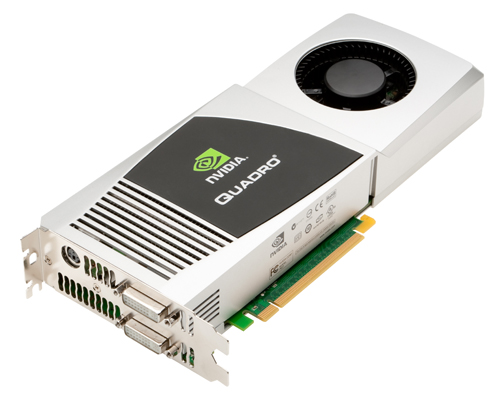
NVIDIA Quadro FX 4800The NVIDIA Quadro FX 4800 - currently the most advanced professional graphics solution targeted at users of a Mac Pro - the official announcement. The new graphics card is 20-23 April at the NVIDIA booth, NAB 2009: SL 7906, lower South Hall of the Las Vegas Convention Center.

NVIDIA hopes to meet the needs of Mac users by the introduction of 3-pin connector for true stereo bucket's 3D imaging and the ability to dynamically assign the calculation, geometry, shading and pixel processing power. Thanks to these characteristics (and not only), the new Quadro FX 4800 GPU, a very important asset for many users of the core Mac business applications, NVIDIA think.

The firm is also important functions in the Quadro FX 4800 GPU for the Mac, which is a massive 1.5GB frame buffer and memory bandwidth to 76.8 GB / sec, a high throughput for interactive visualization of large models. The graphical solution features high-performance real-time processing of large structures and frameworks, and the highest quality and resolution full-scene anti-alias (FSAA) and producer. Besides Dual Link DVI and stereo connectors, the 4800 also has Boot Camp support, making the Mac Pro with Windows users to access domestic Quadro professional GPU accelerated 3D graphics performance and features.

"Some of the most challenging visual computing problems are resolved at the Mac platform, Jeff Brown, General Manager, Professional Solutions, NVIDIA said." The Quadro FX 4800 offers power and speed to meet these high standards. “

Also available for both PC and Mac, NVIDIA particularly emphasized the usefulness of the new Quadro FX 4800 GPU on the Mac Pros. The graphic solution will be available from next month, when it will retail for $ 1799 USD. Interested parties will be able to develop their own Quadro FX 4800 card through Apple.com and select Apple resellers and integrators, according to NVIDIA workstation.

ECS GeForce 9500 GT Based Card

Written by IT News on 5:52 AM

Elitegroup Computer Systems (ECS), one the world's leading motherboards, video cards, barebone systems, and notebook manufacturer, has just launched another graphics cards based on the latest NVIDIA GeForce 9500 GT graphics processing Units (GPU), N9500GT-512MU-F. The new ECS board comes with 512 MB of GDDR3 memory and a 128-bit memory interface.


The core clock of the card is set at 550 MHz, while the memory runs at 1600 MHz Clock Speed, making it possible to deliver unprecedented graphics power. The N9500GT-512MU-F graphics cards are meant to be a suitable product for ordinary players, and it comes with support for NVIDIA PhysX and NVIDIA Cuda technology.

The physics simulations in games are delivered with great results, while the acceleration for applications such as video and audio encoding is also impressive, better visual experience for all users. Through support for NVIDIA PhysX and NVIDIA Cuda technology, the door to scientific research projects such as oil and gas extraction, product design, medical imaging, has also opened up. ECS N9500GT-512MU-F can also be used with platforms that have multi-graphics, so it comes with support for NVIDIA SLI technology, which makes it possible to exploit the delivered performance level.

The card comes with support for Microsoft DirectX 10, PCI Express 2.0 interface, and 2 x dual-link DVI output for a resolution up to 2530 x 1600. Mainstream players will now enjoy a brief that rise high above similar products on the results page. Multimedia enthusiasts can also take advantage of the features of this card, as it will with the support of PureVideo HD technology. The picture clarity, smooth video, accurate color, and precise image scaling for film and video are leveraged through high-definition video decoding acceleration and after treatment capacity N9500GT-512MU-F.

ECS has been a pioneer in the motherboard design and manufacturing, and now the company is also supplying computers, laptops, servers, motherboards, video cards, wireless solutions and handheld devices around the world. The motherboard maker has recently announced that its classmate PC shipments will increase and it is likely to break the one million unit mark at the end of this year. This seems to be a result of a higher demand on the market.

Download Download Subtitle Workshop 4.0 Beta

Written by IT News on 9:40 PM

The ultimate subtitle editing tool, which includes a spell-check function and advanced feature preview subtitle Seminar, supports all the formats you need subtitles, and has all the features you would want from a subtitle editor. Some of these characteristics are: a convenient interface that can handle both time frames and through subtitles, subtitles mass conversions, you can check and correct errors in the subtitles can get frames of the movie, joins the extensions you want subtitles, adjust subtitle, the latest list files, etc.

Subtitle workplace makes subtitle creation / editing / conversion tasks almost pleasant, friendly and intuitive interface blends easily access the menu, and should have the characteristics of the advanced features and remarkable speed and stability, drastically reducing time editing subtitles.

Subtitle Seminar includes spell checking functions, and advanced video preview feature that can facilitate the task even more. This is the best choice for novices, experts or fansubber. There is a taste, and you forget everything else!

Developer: URUSoft
License: Freeware
Size / OS: 1.03 MB, Windows All
Last Updated: January 25th, 2008, 19:37 GMT
Download Subtitle Workshop 4.0 Beta 2 / 2.51

DirectX Redistributable 9.0c March 2008

Written by IT News on 9:40 PM

A very useful application to launch applications and display rich multimedia elements
Microsoft DirectX is a group of technologies that make Windows-based PC an ideal platform for running and displaying applications rich in multimedia elements such as full-color graphics, 3D animation, and video and audio-rich.

DirectX 9.0 includes safety and efficacy of the upgrade, as well as many new opportunities for all technologies that are available for applications using DirectX 9.0 API for.


DirectX 9.0 End User Runtime setup minimizes the download size, but must be connected to the Internet during installation.

In 9.0 DirectX Redist is available for download for those users who do not have access to the Internet during the installation or the installation difficulties connecting to the server, Microsoft.

This update provides DirectX 9.0c end-user multi-languaged circulated that developers can integrate into their products.

In pervasive license agreement covers the terms under which developers may use the Redistributable. For more information, see DirectX SDK EULA.txt and DirectX Redist.txt files in a directory of the license.


Developer: Microsoft
License: Freeware
Size / OS: 69.4 MB, Windows 2K/XP/2003/Vista/XP X64
Last Updated: March 10th, 2008, 08:41 GMT
Download DirectX Redistributable 9.0c March 2008


Opell FLV to WMV MPEG MOV AVI iPod PSP 3GP MP4 Zune Converter 2.1.6

Written by IT News on 10:32 PM

This software is great! Unfortunately this is not absolutely free

A convenient and powerful software can convert FLV files to the most popular video formats.

Opell FLV for WMV MOV AVI MPEG iPod PSP 3GP MP4 Zune converter is simple to use, but powerful utility can convert your FLV files are the most popular video formats. It can convert video flv file for all popular video formats such as WMV, MPEG, MOV, AVI, ASF, iPod, PSP, 3GP, MP4, Zune, Apple TV, iPhone video and audio format format. Very user-friendly interface.

It's so simple that anyone can use, it operates in a few quick steps and takes only a few minutes, even seconds! Free Download it is a wonderful experience now!


Here some key features:

· Convert flv video to WMV-Windows Media Video.
· Convert flv video to ASF-Advanced Streaming Format.
· Convert flv video to AVI-Audio-Video Interleaved.
· Convert flv video to MOV-QuickTime.
· Convert flv video to MP3-MPEG Layer-3 Audio.
· Convert flv video to MPEG-1 Movie.
· Convert flv video to MPEG-2 Movie.
· Convert flv to iPod MPEG-4 Movie.
· Convert flv to MP4-MPEG-4 Video.
· Convert flv to PSP-PSP MPEG-4 Video.
· Convert flv to 3GPP-3rd Generation Partnership Project.
· Convert flv to 3GPP2-3rd Generation Partnership Project.

Requirements:
· DirectX 8.1 or higher
· Pentium 300 MHz or better
· 128M or more RAM
· About 50Mb free hard drive space or better

Limitations:
· 33% conversion limit
· Nag screen

Developer: Opell Software
License: Demo , 27 $ to buy
Size / OS: 7.61 MB, Windows All
Last Updated: April 9th, 2008, 05:57 GMT
Download Opell FLV to WMV MPEG MOV AVI iPod PSP 3GP MP4 Zune Converter 2.1.6

Download Download Subtitle Workshop 4.0 Beta

Written by IT News on 11:29 AM

The ultimate subtitle editing tool, which includes a spell-check function and advanced feature preview subtitle Seminar, supports all the formats you need subtitles, and has all the features you would want from a subtitle editor. Some of these characteristics are: a convenient interface that can handle both time frames and through subtitles, subtitles mass conversions, you can check and correct errors in the subtitles can get frames of the movie, joins the extensions you want subtitles, adjust subtitle, the latest list files, etc.

Subtitle workplace makes subtitle creation / editing / conversion tasks almost pleasant, friendly and intuitive interface blends easily access the menu, and should have the characteristics of the advanced features and remarkable speed and stability, drastically reducing time editing subtitles.

Subtitle Seminar includes spell checking functions, and advanced video preview feature that can facilitate the task even more. This is the best choice for novices, experts or fansubber. There is a taste, and you forget everything else!

Developer: URUSoft
License: Freeware
Size / OS: 1.03 MB, Windows All
Last Updated: January 25th, 2008, 19:37 GMT
Download Subtitle Workshop 4.0 Beta 2 / 2.51

Nvidia delay to announce Hybrid SLI technology

Written by IT News on 8:23 AM

By: Bogdan Botezatu, Hardware Editor

NvidiaNvidiaNvidia has reportedly delayed the introduction of hybrid SLI technology, as drives to support it, has not finished yet. If you can hardly expect your pair of GeForce 8200 GPU on the other hand, need to better shift your attention to something else until the drivers are officially released.

According to reports, Nvidia officials sent a note of manufacture
partners earlier this week that the company announced the delay of hybrid technology SLI. According to the notification, the company is the transfer of technology mainly because it is the driver, the unit has not finished its implementation software.

"We are still experiencing delays in receiving kits sent as a product encountered delays, drivers are now finalized and sales tools are being finalized", said the notice.

In hybrid technology SLI provides users with low-end and mid-range graphics cards to a new method for improving graphics performance by pairing the work of discrete and integrated GPU work as a whole. Hybrid SLI is based on Nvidia two of the next generation of technology, called the GeForce boost and HybridPower. In GeForce increases single discrete Nvidia graphics card to the "working" with the integrated graphics core located on the Nvidia-food motherboard.

The second piece of the puzzle is HybridPower technology, which adjusts the graphics speed, power consumption and fan noise in a manner in accordance with the system of work.

When you run graphics-intensive applications, the technology will provide HybridPower high volumes of graphics computing power, and thus increase the consumption of electricity. When you run the software for word processing or multimedia players, the technology will switch to reduce power mode.

The report also claimed that hybrid technology SLI will begin shipping in sample units in the second half of April, the retail availability planned for May and June. Nvidia representatives were not immediately available for comment.

Free Vista Codec Package 4 Final release!

Written by IT News on 1:23 PM

In dealing with codecs, is not synonymous with better. Since less the amount of the system is the best setting. That is exactly what the Vista codec package for you.

With this package, you should not have to install or a different codec filter. Codecs are always a big problem for users of computers. That's because you are never 100% viable solution for users working in the computer.

There is some good solutions codec package there, but none of them have done everything I wanted. I was always in need of a stunt, the adaptation, and even a new installation just around the codecs I needed / wanted, and most of the time, the folder is still not play. I have never claimed, a guru of the media. My experience is that the media about double that I downloaded a file, and we hope that he plays.

What I know is the question of how software package. I have therefore decided to package some of the codecs and with the rest of the world. With this package
all sorts of conflicts are handled. Many users suggested defaults.

It contains no multimedia player, and it is not of files. With this package installed, you will be able to use any multimedia player, limited by the capacity of the player, the DVD to play movies and video clips from virtually any type of file.

Video streaming is used in all Web browsers. You do not need a default settings can enjoy a variety of content of the media immediately.

Users have the option to choose what is installed by the public or distributable after installation without supervision, you can remove it without removing portions of the entire package. The next versions will recognize that in earlier versions and the ability to perform the upgrade of the plant.

Please attention: YOU SHOULD UNINSTALL your previous version. DO NOT upgrade with this release!

Troubleshooting when you got problem on installation

  • 7-Zip: Internal error, code 105

Developer: Shark007
License: Freeware
Size / OS: 12.9 MB, Windows XP/Vista
Last Updated: February 7th, 2008, 23:11 GMT
You can download Vista Codec Package 4.5.8 Final for free
Alternative 1, Alternative 2

Download Windows Essentials Codec Pack!

Written by IT News on 11:49 AM

Again, here is you can download and use it for free of Windows Essentials Codec Pack. This software developed by MediaCodec.Org and the licensed is Freeware.

Download source link: Download windows essentials coded pack

Windows Essentials Codec Pack is a collection of the major audio and video codecs and DirectShow filter. With Windows Essentials codec pack, you should be able, 99% of all movies and music files that you download on the Internet, always on the last day with codecs with audio / video codec update service, and the removal The many conflicts and the error Causés through the use of multiple codecs for decoding the same types of files.

Download FLVPlayer4Free 2.3.0.0

Written by IT News on 11:19 PM

If you are looking a simple FLV Player for your Computer, then FLVPlayer4Free is good choice flv files player.

FlvPlayer4Free is a greatly improved solution that allows even the most demanding users to easily play their favourite FLV files in the hard disk or from internet.

Here are some key features and function lists:
· Drag & Drop: drag your FLV file and drop it into FLVPlayer4free main window
· You can save frame as image (JPG, PNG, BMP)
· Support Multi language: easily create/turn into your language
· Full Screen for a wider image
· Fully Resizable window
· Always on top to keep an eye on it anytime
· Handy volume commands and mute option
· Remember last settings
· Auto hide control and mouse cursor on full screen
· FLV Association
· Useful autoplay and autorepeat
· Practical Play, Pause, Rewind, Fast forward and Seeking bar buttons
· Elapsed and total time always displayed to keep them under control
· Multi instance which allows you to run muliple FLV files at the same time
· FLV information always available

Please note that This software is marked as adware because it displays advertisement banners or other type of commercials ads while running.

Author and download location:
Developer: flvplayer4free
License: Adware
Size / OS: 1.39 MB, Windows All
Last Updated: January 30th, 2008, 20:24 GMT
Download FLVPlayer4Free 2.3.0.0

Apex Free 3GP Video Converter

Written by IT News on 6:52 PM

Apex Free 3GP Video Converter description

Extremely fast conversion speed and user friendly interface let you convert video files between many formats with ease and faster.

Apex Free 3GP Video Converter is a tool created to meet all your needs of convert file .

Apex Free 3GP Video Converter supports the conversion of your favorite movies from AVI , DIVX, MOV, QuickTime, MPEG, VCD, DVD, WMV, ASF, RM, RMVB to 3GP.

Extremely fast conversion speed and friendly user interface let you convert video files between many formats with ease.

The powerful features and unbeatable price make Apex 3GP Video Converter an affordable and powerful video conversion solution on personal computer

Here are some key features:
· Extreme fast Conversion speed;
· Very Easy to Use.
· Convert mpeg, vcd, dvd to 3GP.
· Convert wmv , asf to 3GP.
· Convert divx , xvid , avi to 3GP.
· Convert mov , quicktime to 3GP.
· Convert rm , rmvb to 3GP .
· Support batch files conversion.
· Specifies start and end position while convert
· No Technical Knowledge Required.

Note: Free version only convert for VIDEO to 3GP

Developer: Apexsoft Inc
License: Freeware
Size / OS: 14.1 MB, Windows All
Last Updated: January 25th, 2008, 13:17 GMT
Download Apex Free 3GP Video Converter 6.15

Download Apex Free 3GP Video Converter 6.15

Written by IT News on 7:14 PM

DOWNLOAD LOCATIONS FOR APEX FREE 3GP VIDEO CONVERTER

To download from torrent links, you must use a bittorrent client.

Download Apex Free 3GP Video Converter 6.15

Apex Free 3GP Video Converter is a tool created to meet all your needs of convert file . Apex Free 3GP Video Converter supports the conversion of your favorite movies from AVI , DIVX, MOV, QuickTime, MPEG, VCD, DVD, WMV, ASF, RM, RMVB to 3GP. Extremely fast conversion speed and friendly user interface let you convert video files between many formats with ease. The powerful features and unbeatable price make Apex 3GP Video Converter an affordable and powerful video conversion solution on personal computer Here are some key features of "Apex Free 3GP Video Converter": · Extreme fast Conversion speed; · Very E... [ read more about Apex Free 3GP Video Converter ]

Search This Blog

Ads and Sponsored by:


Want to subscribe?

Subscribe in a reader.